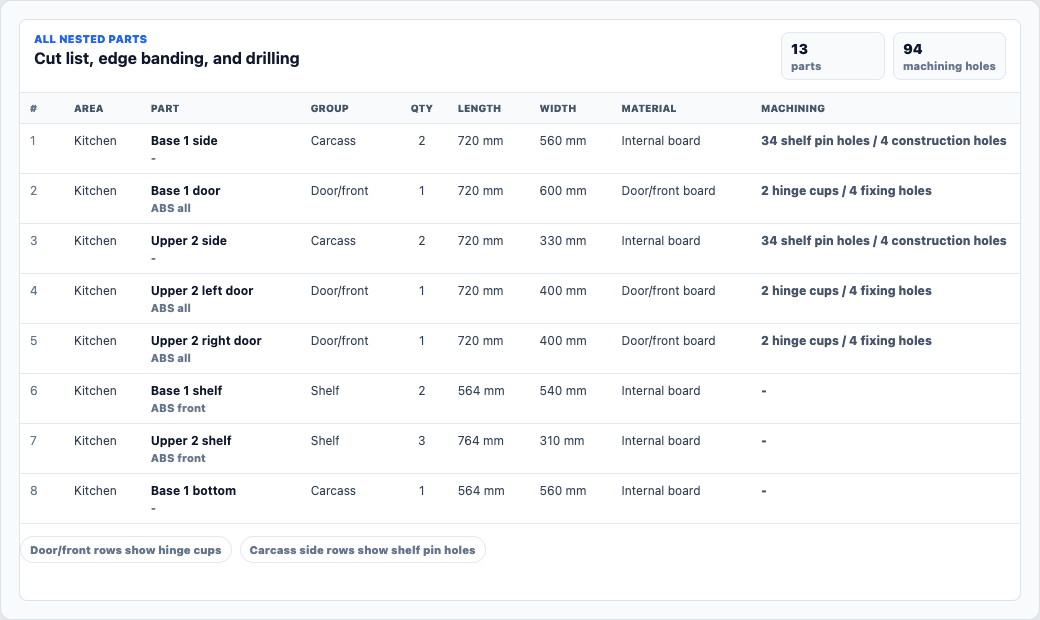
Cabinet cut list detail
Review part names, quantities, sizes, board or finish, edge banding, hinge cups, shelf pins, construction holes, and other machining notes in one production-facing view.

Cabinet cut list software
JOINA carries cabinet parts, dimensions, materials, edging, drilling, and machining details from the cabinet build into cut list and nesting review. Estimating and production can work from the same job logic.
Short answer
Cabinet cut list software converts cabinet construction choices into a structured list of the parts required for the job. A useful cut list identifies more than width and height: it keeps the part name, quantity, board or finish, edge treatment, cabinet reference, and relevant drilling or machining detail clear enough to review before material is ordered or cut.
Product output
JOINA links individual cabinet parts with a visual nesting preview. That makes the material allowance easier to inspect during quoting and the part set easier to review before handover.
Review part names, quantities, sizes, board or finish, edge banding, hinge cups, shelf pins, construction holes, and other machining notes in one production-facing view.
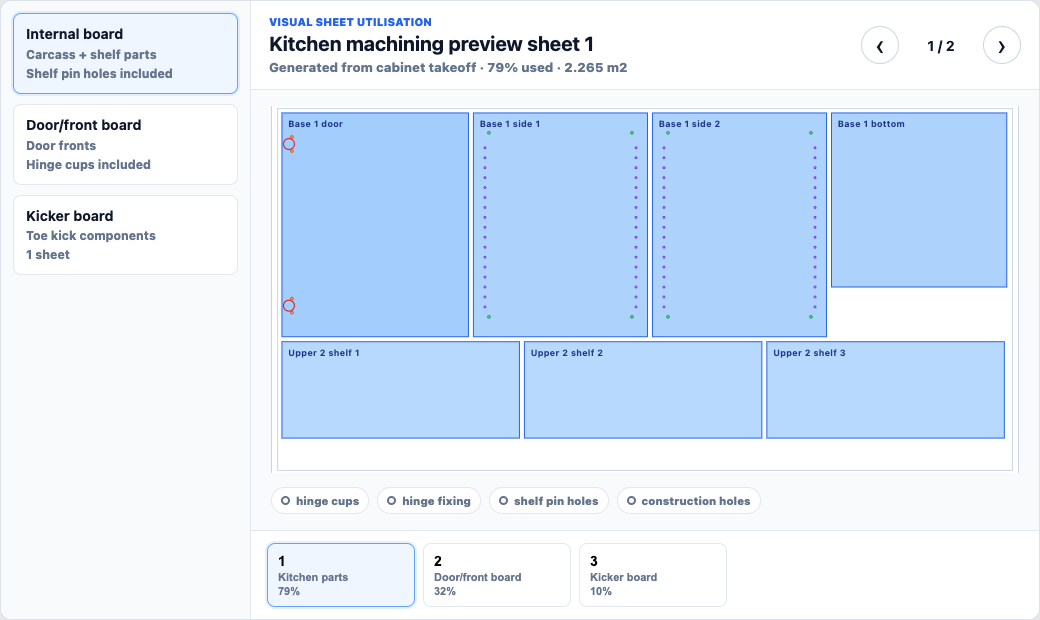
See parts in sheet context to support material takeoff, waste allowances, purchasing checks, and a more defensible quote.
Information that survives handover
Dimensions alone leave too much interpretation on the factory floor. JOINA keeps the production language close to the cabinet and the commercial logic that created it.
Data flow
The cut list is an output of the cabinet build. It is not a second spreadsheet that somebody must reconstruct after the quote is won.
Set width, height, depth, cabinet type, shelves, doors, drawers, fillers, kickers, ends, and other construction choices.
Apply carcass board, fronts, edging, hardware, finishes, and shop rules from the same library used to price the work.
JOINA translates the cabinet build into panels and associated production detail instead of asking for a separate manual takeoff.
Check custom conditions, exposed ends, edge treatment, drilling, construction choices, and allowances before release.
Let the part set and nesting preview support material quantity, waste, purchasing, and the estimated sell price.
Cut lists and nesting previews help a cabinet shop inspect parts, materials, edging, machining intent, and sheet allowances. Direct CNC output adds machine-specific tooling, file formats, post-processors, and tested integration. If direct machine control is essential, verify those requirements against your exact CNC, saw, and production stack.
Pre-production review
A short review protects the material order and the cabinet build.
See a real output
Try JOINA free for 30 days or book a walkthrough to see cabinet parts, nesting, drawings, and pricing move through one job.
Cabinet cut list FAQ
It converts cabinet construction data into structured parts, quantities, dimensions, materials, edging, and relevant machining details for estimating and production review.
Yes. JOINA provides visual nesting previews that help the team inspect sheet use and support material and waste allowances.
The cut list is generated from the cabinet build, so the goal is to keep parts aligned with cabinet dimensions, construction, and material choices rather than retyping them elsewhere.
JOINA shows details such as hinge cups, shelf pin rows, construction holes, edging, and other part-level production notes.
Yes. A structured part set and nesting preview make material quantity, sheet use, edging, hardware, and waste easier to include and audit in the quote.
JOINA supports cut list, nesting, and machining-detail review. Confirm any direct CNC file, tooling, and post-processor needs separately for your machine.